
You can capture and index documents from the local computer to Archives using the standard drag-and-drop method. If you select multiple files, you can choose to capture them with the same indexing information (such as when you import a batch of invoices from the same vendor) or you can assign each of them different information. While GlobalSearch responds to standard drag-and-drop requests, it is import to know that not all drag-and-drop operations function in this manner. If you are interacting with web pages, or other applications that do not support standard drag-and-drop requests, you may need to first download your files to Windows and then drag them to GlobalSearch.
-
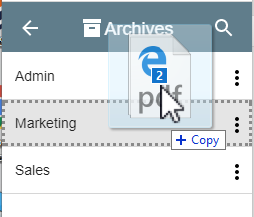
To drag documents into GlobalSearch, ensure the target Archive is in view in the Archives Pane. (It does not need to be selected.)
-
Select your files in Windows and drag them to the target Archive. When it is highlighted, drop them in.
-
In the Index Viewer that appears, enter your indexing data and click Save.
Support for drag and drop operations from Microsoft Outlook into a GlobalSearch Archive is available. To enable this feature, install the Outlook Drag-and-Drop extension. Once enabled, a user can drag and drop any email message directly from Outlook into GlobalSearch.