
Use regular expressions with Pattern Matching Zones in your GlobalCapture Templates.
The Pattern Match Zone matches text using specific criteria written in a programmatic syntax called RegEx (short for regular expression). The Zone makes use of a Microsoft .NET version of regular expressions. There may be slight variations in both syntax and functionality between various regex implementations. When testing patterns, it's always a good idea to make sure you are testing using a tool that is based on .Net like regexstorm.net.
Regular expressions can be written to be written to target a very specific text pattern, or can be written to allow for variations in the way data may be presented.
This RegEx is used to locate a zip code as 1) a five-digit string, 2) a five-digit string followed by a hyphen and a four-digit string, 3) a five-digit string followed by a four-digit string: ^\d{5}(?:[-\s]\d{4})?$
-
^ = Start of the string.
-
\d{5} = Match 5 digits (for all three sample patterns)
-
(?:…) = Grouping
-
[-\s] = Match a hyphen (for sample 2) or a space (for sample 3)
-
\d{4} = Match 4 digits (for samples 2, 3)
-
…? = The grouping pattern before it is optional (for sample 1)
-
$ = End of the string
Pattern Matching
|
Search String |
Description |
Example |
|
A simple string of letters or numbers |
Simple String. A RegEx expression of simple letters or numbers will pattern match specific phrases or words. |
The search string “Number” will match the first occurrence of the word “Number” on the scanned document (or all occurrences of “number” into a Multi-Value Field). |
|
(?i) |
Case Sensitivity. Pattern matching is case sensitive by default. To create a case-insensitive search, add the modifier “(?i)” to the beginning of the string. |
|
|
Multi-line search string |
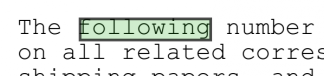
Sequence Based on Priority. A search string of multiple lines can instruct the Template to search for different words or phrases in a specific order of priority. This pattern logic can be used in cases where the content of a document or region can take multiple forms. Using a sequence based on priority, pattern matching enables you to anticipate multiple scenarios of incoming data and adapt the behavior step by step. |
The Template attempts to match “following” first. Since a match is found, it does not continue on to match “number.” In a case where the first line fails to match, the Template matches “number” on its second pass. 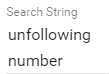

|
|
. |
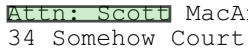
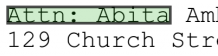
Wildcard. Many characters hold special meaning in RegEx syntax. A period is used as a wildcard to match any character or number in the document. This can be used create patterns that match a variety of different phrases or words with fuzzy logic. |
The search string “Attn: …..” will match both “Attn: Scott” and “Attn: Abita.” |
|
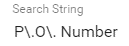
\ |
Escape Character. In cases where you want to use a special character literally, you must strip its special meaning with an escape character. In RegEx, a backslash is used to invoke this alternate interpretation. |
|
|
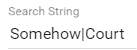
| |
Logical Operator. Logical operators allow pattern matching an extra degree of complexity. The pipe character signifies a logical OR operator. |
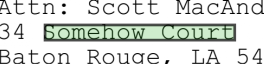
A search string “Somehow|Court” will return matches for either of the words “Somehow” and “Court.” |
|
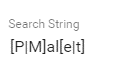
[a|b] |
Character Range a or b. In addition to literal characters and wildcards, search strings can detect groups of characters using character ranges and logical operators. |
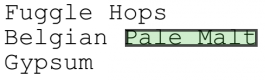
The search string “[P|M]al[e|t]” detects a word which: begins with either a “P” or an “M”; followed by “al”; and ends with either an “e” or a “t.” When checked against the sample document, this pattern matches both ”Pale” and “Malt.” |
|
[abc] |
Character Range a or b or c. A search string to detect this OR this OR that. |
A search string “[BCH]at” will match “Bat,” “Cat,” and “Hat.” |
|
[^abc] |
Character Range Not a or b or c. A search string to detect characters which are not this OR this OR that. |
The search string “[^A]” will match any character except capital A. |
|
[0-9] |
Character Range 0 to 9. A search string to detect a range of digits between 0 and 9. |
The search string “[0-9]” will match any one digit. |
|
[a-z] |
Character Range in Lowercase Letters. A search string to detect letters in a range with lowercase letters. |
The search string containing “[a-z]” will match any one lowercase letter. |
|
[a-z|A-Z] |
Character Range in Both Uppercase and Lowercase Letters. A search string to detect letters in a range, regardless of the letter case. |
The search string containing “[a-z|A-Z]” will match any letter of the alphabet, whether uppercase or lowercase. |
|
* |
0 or More Quantifier. Quantifiers are used to specify how many instances of a character or string are required to produce a match. Use an asterisk to search for a range of none to unlimited. |
The search string containing “7*” will match 0 to infinite 7’s. |
|
c+ |
1 or More Quantifier. Use a plus sign to search for a range of one to unlimited number or characters or strings. |
The search string containing “Z+” will match 1 to infinite Z’s |
|
? |
0 or 1 Quantifier. Use a question mark to search for a range of none or one characters or strings. |
The search string containing “colou?r,” will return matches for either of the words “color” or “colour.” |
|
{#} |
Exactly the Specified Number Quantifier. Use a number surrounded by braces to search for a specific quantify of characters or strings. |
The search string containing “7{3}” detects three sevens in a row. |
|
{#,} |
Exactly the Specified Number or More Quantifier. Use a number, followed by a comma, and surrounded by braces to search for a specific quantify or more of characters or strings. |
The search string containing “Z{3,}” detects three to infinite Z’s. |
|
{#,#} |
Exactly the Specified Number or More Quantifier. Use a number, comma, number, surrounded by braces to search for characters or strings between the first number and the next. |
The search string containing “Z{3,5}” detects three to five Z’s. |
|
[0-9]{#} |
Number with Specific Digits and Amounts of Digits. Use a combination of Character Range 0 to 9 and Exactly the Specified Number Quantifier to search for specific patterns of digits. |
The pattern “[0-9]{8}" matches any eight digits in a row, such as an eight-digit purchase order number. |
|
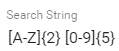
[A-Z]{#} [0-9]{#} |
Compound Combinations of Letters and Digits. Use a series of RegEx sequences of characters to create very specific or for very general (“robust”) search patterns. |
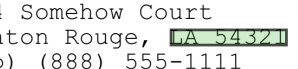
To search for U.S.A. addresses, the pattern “[A-Z]{2} [0-9]{5}” matches a state code plus a ZIP code (two uppercase letters followed by a space and then a five-digit number). |
|
[0-9]{3}\.[0-9]{3}]\.[0-9]{4} |
Compound Combinations with Escape Characters. Use a series of RegEx sequences of characters, including ones which use a special character literally. |
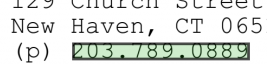
The pattern “[0-9]{3}\.[0-9]{3}]\.[0-9]{4}” matches a seven-digit phone number plus area code, separated by periods. Note that escape characters are required. 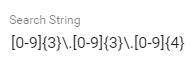
|
|
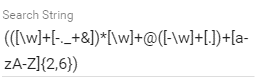
(([\w]+[-._+&])*[\w]+@([-\w]+[.])+[a-zA-Z]{2,6}) |
Diversity and Robustness of Pattern Matching. Pattern Matching with RegEx is an extremely powerful tool. With a good understanding of its syntax, the possibilities are endless. |
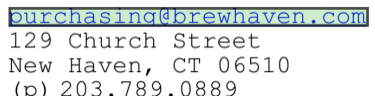
“(([\w]+[-._+&])*[\w]+@([-\w]+[.])+[a-zA-Z]{2,6})” will match valid email addresses of various forms. |








Additional Resources
Here are a few online resources that can help troubleshoot and further your understanding of pattern matching: