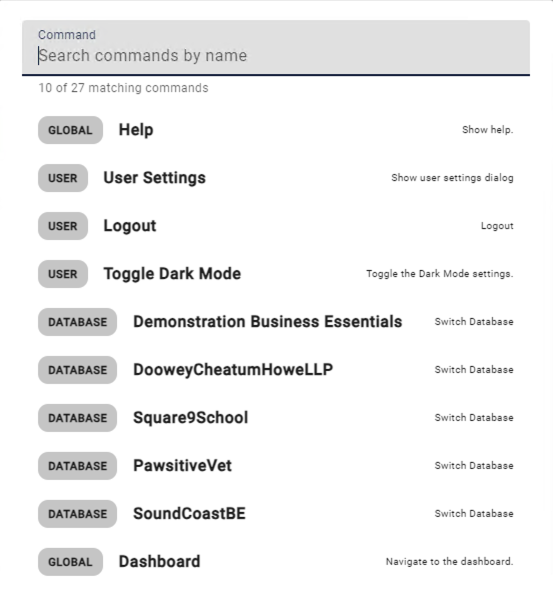
Keyboard Shortcuts
For users who prefer to keep their hands on the keyboard instead of navigating the a mouse or touchpad when working with their documents, GlobalSearch Go offers some keyboard shortcuts.
To access a full listing of the keyboard shortcuts in the Search Results View or the Document Viewer, simply press Shift + ?.
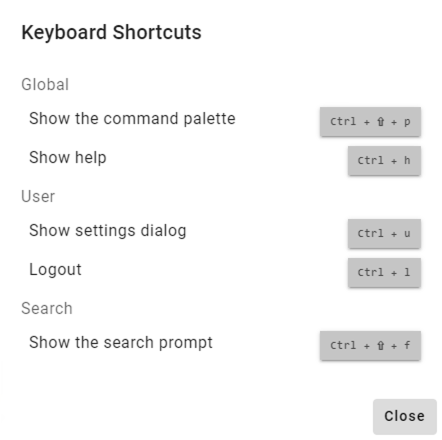
Command Palette
To expand the powers of keyboard navigation and feature location beyond what hotkeys can support, this feature provides a keyboard invokable command palette that will allow for a fuzzy search of available registered commands and a number of components in the UI.
-
Invoke the command palette with ctrl + shift + p.
-
Start typing part of the command you want to find to filter the results.
-
Some objects are entered into the command palette with prefixes. These results will only show if the query starts with this prefix
-
@ will filter against searches.
-
-
Pressing enter will invoke the current first match.
-
The down and up arrow keys can be used to select a match from the list, pressing enter to execute the highlighted command.
-
esc will close the dialog, as well as clicking anywhere outside of it.