
GlobalSearch C2 for Business Essentials allows users to work in different languages based on their individual preferences. This means that the co-workers in other parts of the world can quickly change their preferences to allow them to work in their native language. Please note the following on language preference support.
-
This setting is at the user level and is not a global setting.
-
The default language for GlobalSearch C2 for Business Essentials is English
-
Languages supported include the Latin based Romance languages including; Spanish, French, Portuguese, Italian, German Dutch and Romanian.
-
Changing the language preference only translates the interface of the application. Any stored content or index data will remain in its native language.
-
Additional Language support can be added through a translation file which can be uploaded with the help of the Square 9 Support team. Please contact your Authorized GlobalSearch Reseller to learn more.
-
GlobalSearch C2 for Business Essentials does not currently support multi byte languages (i.e. Chinese, Japanese, Korean, Hebrew, Arabic)
Changing Your Language Preference
-
Access the user settings by clicking on the gear icon in the upper right hand corner of the home page as show below
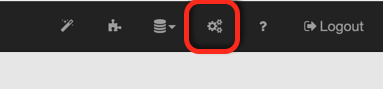
Accessing the Setting Menu
-
Select the Language tab from the user settings.
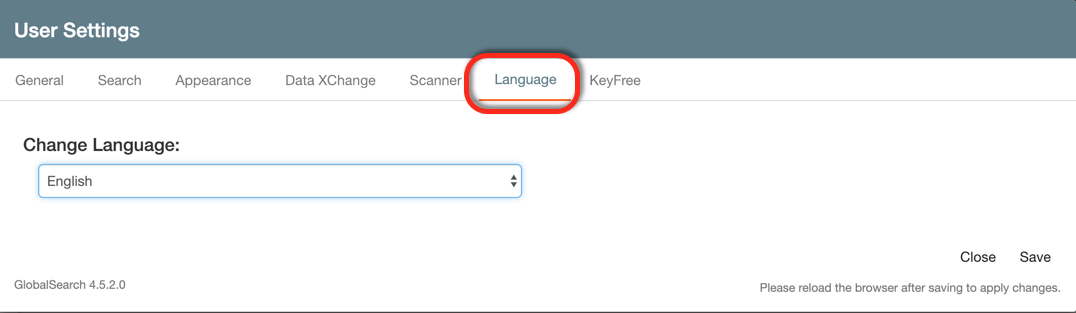
Accessing the Language Menu
-
Select the preferred language from the drop down list of available options.
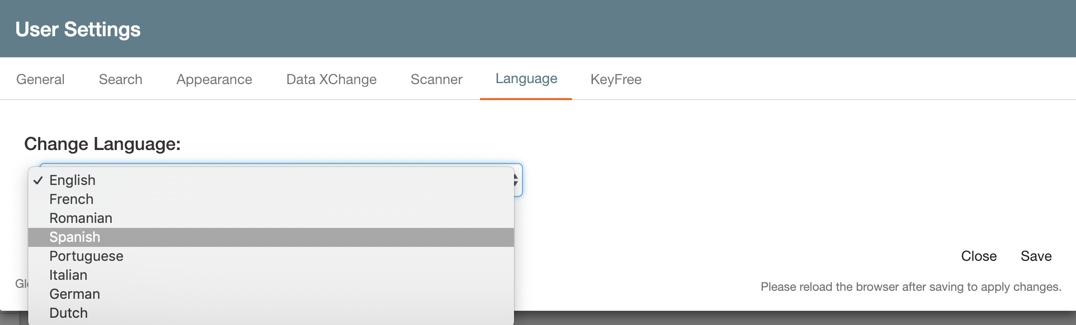
Selecting your Language Preference
-
Click Save to retain your language preference.