
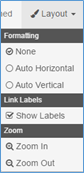
Use the Layout menu to change the view of a Workflow on the Design Canvas.
-
In the Formatting group, choose the layout of the Workflow elements.
-
Select None to position Nodes and Connections freehand.
-
Auto Horizontal to line up the elements horizontally.
-
Auto Vertical to line up the elements vertically.
-
-
To show Connections labels, in the Link Labels group, select Show Labels.
-
Deselect for a very dense Workflow and want to save space on the Canvas.
-
-
In the Zoom group, select to change the size the elements on the Design Canvas.
-
To zoom in, click Zoom In.
-
To zoom out, click Zoom Out.