
-
To configure security on Workflows, in the Portal interface click Workflow Security.
-
In the Workflow Security dialog box, select Workflows from the Available Workflows list and click the Move Right (right-arrow) button to add them to the Secured Workflows list.
-
To rescind permissions, select users and/or groups from the Secured Workflows list and click the Move Left (left-arrow) button to return them to the Available Workflows list.
-
Click OK to save the settings and close the dialog box.
-
Click Save.
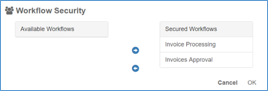
Workflow Security