
-
To print a copy of the Workflow on the Design Canvas to a printer or to a PDF file, in the Workflow menu, in the Current group, select Print.
-
To choose a printer, click Destination and select from the list of available devices.
-
The settings will vary depending upon the printer.
-
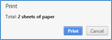
(Print a Workflow)